
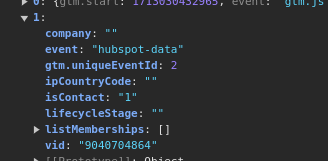
The HubSpot Data Layer Plugin for WordPress puts what HubSpot knows about a visitor (company, lifecycle stage, list memberships) into the Google Tag Manager data layer, so your tags and site can use it. It’s for businesses that run their site on WordPress and their CRM on HubSpot.
The plugin pushes HubSpot visitor data into the GTM data layer
This plugin seamlessly integrates with your WordPress website and fetches valuable data about your visitors from the HubSpot API. It retrieves information such as the visitor’s company, lifecycle stage, IP country code, list memberships, contact status, and visitor ID. This data is then pushed into the Google Tag Manager (GTM) data layer, making it easily accessible for analysis, targeting, and personalization.
To limit API requests, the plugin caches each visitor’s data in WordPress, so later page loads read the cached copy instead of calling HubSpot again.
Who is it for?
The HubSpot Data Layer Plugin is particularly beneficial for small and mid-size businesses that utilize both WordPress for their website and HubSpot for their marketing automation and CRM. By leveraging the power of visitor data, these businesses can create targeted marketing campaigns, personalize user experiences, and make data-driven decisions to optimize their online presence.
Benefits of getting the data in the data layer
By having visitor data readily available in the GTM data layer, small and mid-size businesses can unlock a wide range of possibilities:
- Personalized user experiences: Tailor website content, notifications, and offers based on the visitor’s lifecycle stage, company, or list memberships.
- Targeted marketing campaigns: Create segments based on visitor characteristics and deliver targeted email campaigns, retargeting ads, or personalized promotions.
- Lead prioritization: Identify high-quality leads based on their contact status, visitor ID, or engagement level, and focus your sales efforts accordingly.
- Data-driven decision making: Analyze visitor behavior, conversion rates, and campaign performance to optimize your marketing strategies and allocate resources effectively.
Use cases of the HubSpot Data Layer Plugin
- Lifecycle stage-based notifications: Display personalized website notifications or pop-ups based on the visitor’s lifecycle stage (e.g., “Welcome back, valued customer!” for customers, or “Sign up now for exclusive offers!” for leads).
- Company-specific content: Tailor website content, case studies, or testimonials based on the visitor’s company, providing a more relevant and engaging experience.
- Geo-targeted offerings: Use the IP country code to showcase location-specific products, services, or promotions to visitors from different regions.
- Lead magnet personalization: Customize lead magnets or content upgrades based on the visitor’s list memberships or interests, increasing the likelihood of conversion.
- Exit-intent offers: Trigger targeted exit-intent pop-ups or special offers based on the visitor’s lifecycle stage or engagement level, reducing abandonment and encouraging conversions.
The plugin is a free download
Download the zip below, install it under Plugins → Add New → Upload, and add your HubSpot private app access token in its settings.
Version 1.1, last updated April 2024. It calls HubSpot’s older v1 Contacts API; HubSpot has been moving integrations to its newer APIs, so test it on a staging site before relying on it.
To set up the HubSpot Data Layer Plugin, you’ll need to add your HubSpot private access token in the WordPress backend. This token is essential for authenticating the plugin and granting it permission to access your HubSpot account data. Once you’ve installed the plugin, navigate to the plugin’s settings page within your WordPress dashboard. There, you’ll find a field to enter your HubSpot private access token. Ensure that you have the necessary permissions in your HubSpot account to generate a private access token. If you don’t have a token yet, follow the instructions provided by HubSpot to create one. After adding the token, save your settings, and the plugin will be ready to retrieve visitor data from your HubSpot account and push it into the data layer.
Know the limits before you install it
While the HubSpot Data Layer Plugin is designed to enhance your WordPress website’s functionality and provide valuable insights, it’s important to be aware of potential issues and limitations:
- API Rate Limits: The plugin relies on the HubSpot API, which is subject to rate limits based on your HubSpot subscription tier. Exceeding these limits may result in API errors or data retrieval failures. The plugin includes caching mechanisms to minimize API requests, but it’s essential to monitor your API usage and upgrade your HubSpot plan if necessary.
- API Token Security: The plugin requires you to enter your HubSpot private access token in the WordPress backend. While the plugin takes measures to secure the token, it’s crucial to ensure the overall security of your WordPress site. If your site is compromised, unauthorized access to your HubSpot account data may occur. It’s your responsibility to implement strong security practices and keep your WordPress site updated and protected.
- Data Privacy and Compliance: The plugin retrieves and processes personal data from HubSpot, which may be subject to privacy laws where you operate (for example, California’s CCPA). Make sure your privacy policy and consent settings cover it.
- Plugin Compatibility and Conflicts: The HubSpot Data Layer Plugin may conflict with other WordPress plugins or themes, leading to unexpected behavior or errors. It’s recommended to test the plugin thoroughly in a staging environment before deploying it on a live site and to regularly monitor for any conflicts or issues.
Please note that the HubSpot Data Layer Plugin is provided as-is, without any guarantees or warranties. The plugin developers and contributors shall not be held liable for any damages, losses, or issues arising from the use of this plugin. It’s your responsibility to ensure the proper functioning, security, and compliance of your website when using the plugin.
By using the HubSpot Data Layer Plugin, you acknowledge and accept these potential issues and limitations.
Use the HubSpot Data Layer Plugin at your own risk and ensure that you have the necessary technical expertise and resources to manage and maintain the plugin effectively.