
Mautic knows how engaged each contact is and where they are in your funnel. Your website tags usually don’t. The Mautic Contact Datalayer Plugin closes that gap for ecommerce and SaaS teams that run Mautic.
The plugin puts Mautic contact data where Google Tag Manager can read it
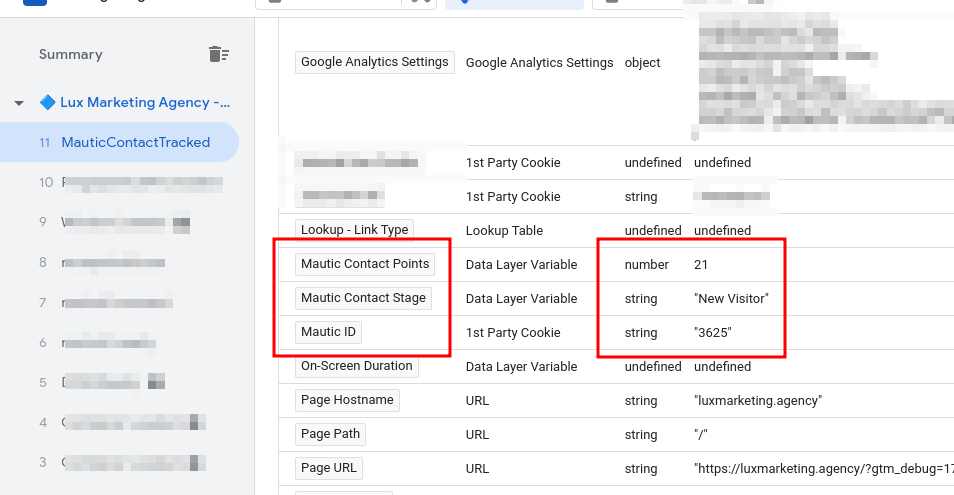
The plugin (DatalayerPushBundle) pushes a known contact’s Mautic points, stage and contact ID into the dataLayer on your site. From there, Google Tag Manager can read them as variables and pass them to GA4 or your ad tags.
- Engagement and funnel stage on every visit: see where each returning contact stands, using the scoring you already set up in Mautic.
- Reporting in GA4: send points and stage to GA4 as user properties or event parameters, and compare behavior by stage.
- Audiences for ads and personalization: build segments from engagement level instead of page views alone.
Ecommerce stores can segment and retarget by engagement
- Segmentation: group customers by their contact points to tailor messages to how engaged they are.
- Retargeting by stage: show ads that match the contact’s stage, so a repeat buyer and a first-time browser don’t see the same offer.
- Loyalty programs: use points to decide who gets loyalty rewards or early access.
SaaS teams can follow onboarding and lifecycle stages
- Onboarding: compare engagement by stage to see where new users drop off.
- Product feedback: invite your most engaged users to give feedback on features.
- Lifecycle email: trigger lifecycle-based email campaigns that respond to each user’s stage, from welcome messages to win-back emails.
Send scores and stages to GA4, not personal details
GA4 can store points and stage as user properties, so you can analyze behavior by funnel stage. Keep names, email addresses and other personal information out of the dataLayer: Google Analytics doesn’t allow personal information to be sent to it. Fire the tags only for visitors who have accepted analytics cookies.
The plugin is included with a Mautic build
The DatalayerPushBundle isn’t a public download. It’s installed and configured as part of a Mautic setup for clients. If you run Mautic, or are planning to, see how email automation builds work.